How to Reference Custom Assets
This guide walks you through how to use your imported custom package assets within your world, using Blueprints or Lua.
1. By Lua
Any kind of asset inside of an imported/mounted package can be accessed with:
local CustomAsset = UE.UObject.Load('Game/YourPackageName/PathToYourAsset/YourAssetName.YourAssetName')
For example, to access a package named Addon_MyFirstAnimationPack with an animation sequence named AS_Crying.uasset, you can load the animation sequence as shown below in your lua scripts:
local CustomAnimationAsset = UE.UObject.Load('/Game/Addon_MyFirstAnimationPack/AS_Crying.AS_Crying')
You can get the full path of an asset by right clicking to it in build mode interface and selecting Copy Object Path in the dropdown menu.
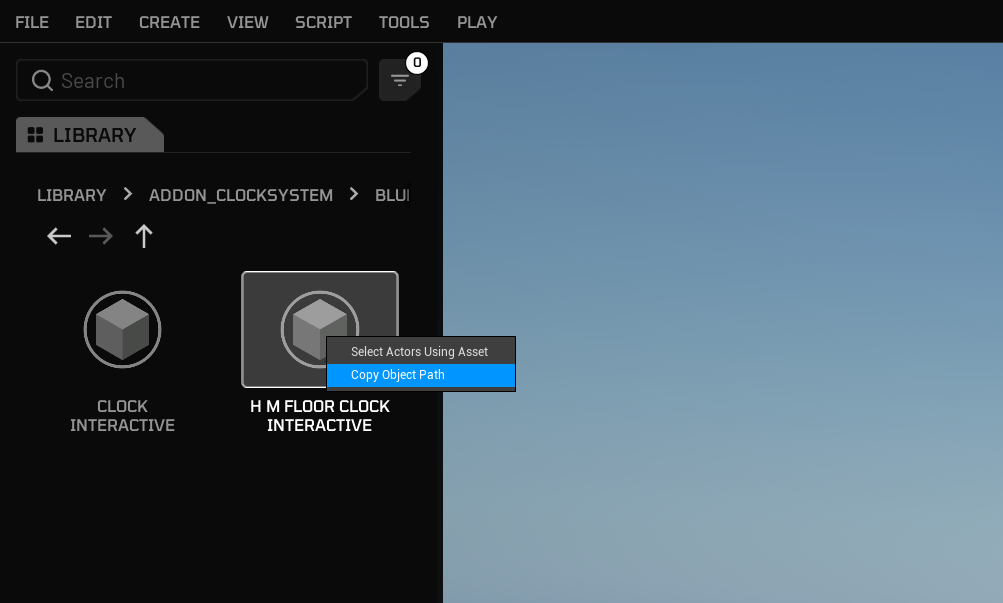
After creating a reference variable to your asset, you can pass it into other functions in your Lua scripts.
2. By Blueprint
[examples coming soon]